Windows Latest Windows Latest
The next feature update, currently codenamed 19H1 and also known as Windows 10 version 1903, will come with improvements to the font management. First and foremost, the Settings app in Windows 10 also comes with a font section that allows users to download, set up and configure fonts on the operating system.
You can easily install, configure, customize, delete and manage fonts in Windows 10. The next update codenamed 19H1 will improve this aspect of Windows 10.
With Windows 10 version 1903, Microsoft is improving the font management by allowing users to set up and configure fonts much easier than before. The revised fonts management allows users to install fonts by using nothing more than a drag and drop.
While you can install fonts directly from the Microsoft Store, you may still want to store font files on your device, no matter from where they were downloaded, and install it in Windows 10 via the Fonts settings.
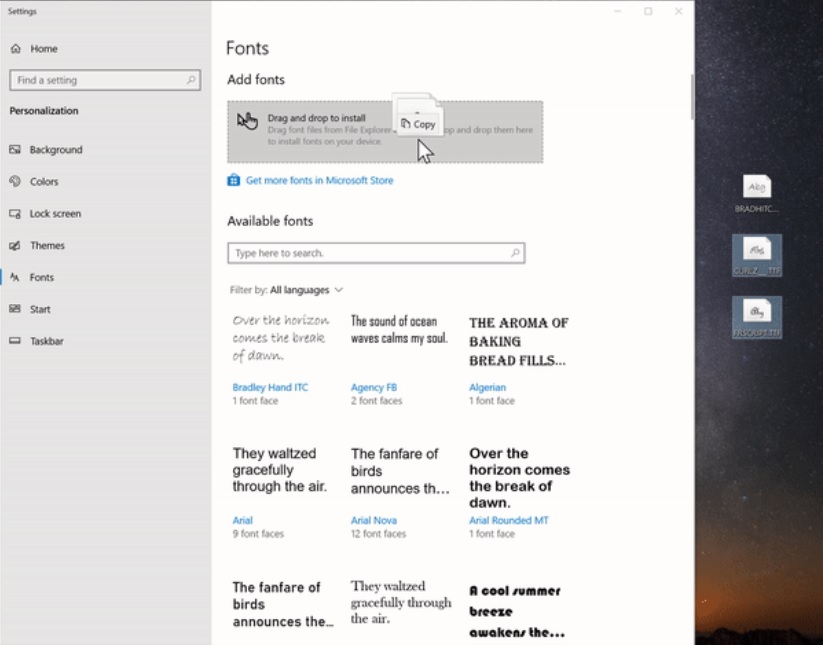
In Windows 10 19H1, you can open Settings > Personalization > Fonts and tap on a box that is called Add fonts. If the font file is pinned to the desktop, you can simply drag and drop it from the desktop or File Explorer (local disks) to this box and Windows will install the font.
After the font is installed, users will find it on the page in the Available fonts section. You can also click on the entry to view the font faces, access additional information and also remove the font.
Microsoft is still testing the new font management improvements and it could be polished before the public rollout. As per Microsoft’s typical schedule, Windows 10 version 1903 general public rollout should kick off in April.
The post Microsoft to make font management easier on Windows 10 appeared first on Windows Latest
Comments