Windows Latest Windows Latest
Microsoft has officially abandoned its mobile operating system and the company is no longer developing new features. The Windows Phone community has reported the possibility of replacing Windows 10 Mobile with a full-fledged desktop operating system and you can finally try the project.
Windows Phone enthusiasts and developers have figured out a way to run the full desktop version of Windows 10 ARM on Lumia 950 and 950 XL. The overall performance of Windows 10 ARM on Lumia 950 or 950 XL is obviously not fast, but it does let you do some crazy things. For example, you can play the full Fallout desktop.
Last week a Windows Phone user posted a video showing the Fallout game running on a Lumia 950 XL. Following this video, another developer demonstrated the desktop operating system on Lumia 950 XL. In the video, the animation was pretty smooth when switching between apps and start menu.
If you’ve got a spare Lumia 950/XL, you might want to try out this experiment on your device.
Today, developer José Manuel Nieto has released a new third-party tool that allows you to install Windows 10 ARM on Lumia 950 and 950 XL. Interestingly, the installation process is easy. To get the desktop operating system on your handset, you need to download WoA installer and installation process can be executed in 2 simple clicks.
Installing Windows 10 ARM on Lumia 950/950XL
To port Windows 10 ARM to your Windows Phone handset, unlock the bootloader of the Lumia 950 XL by using WPInternals tool and connect the phone to the PC with a USB-C cable.
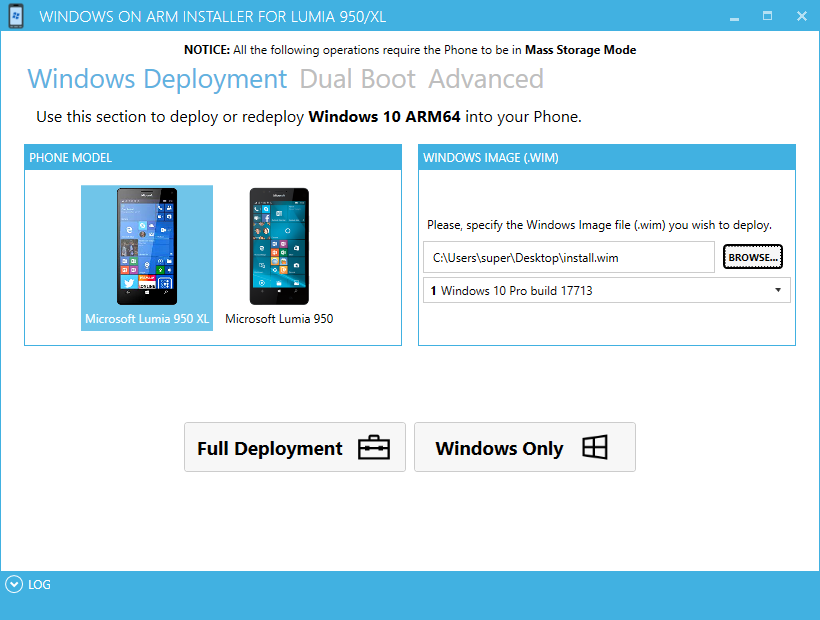
Download Windows 10 ARM64 image, WoA installer and core packages from here. After downloading the files, run the tool, import core packages from the advanced settings, and follow the on-screen instructions to boot the OS your phone.
The post You can install Windows 10 ARM on Lumia 950/XL with new third-party tool appeared first on Windows Latest
Comments