Windows Latest Windows Latest
Google has recently introduced a new settings page layout in the latest builds of Chrome Canary. Settings of Chrome offers advanced options, but the browser requires multiple taps to navigate between the pages in Settings.
When you click on the three dots menu and access settings, Google Chrome displays a page with basic Settings. Users have to click on the left hamburger menu every time to access the other options or advanced settings.
Microsoft’s Chromium-powered Edge, on the hand other hand, offers a more user-friendly approach.
A recent Chrome Canary update has introduced a slightly tweaked Settings page layout that looks similar to the one currently used in the Chromium-powered Microsoft Edge browser.
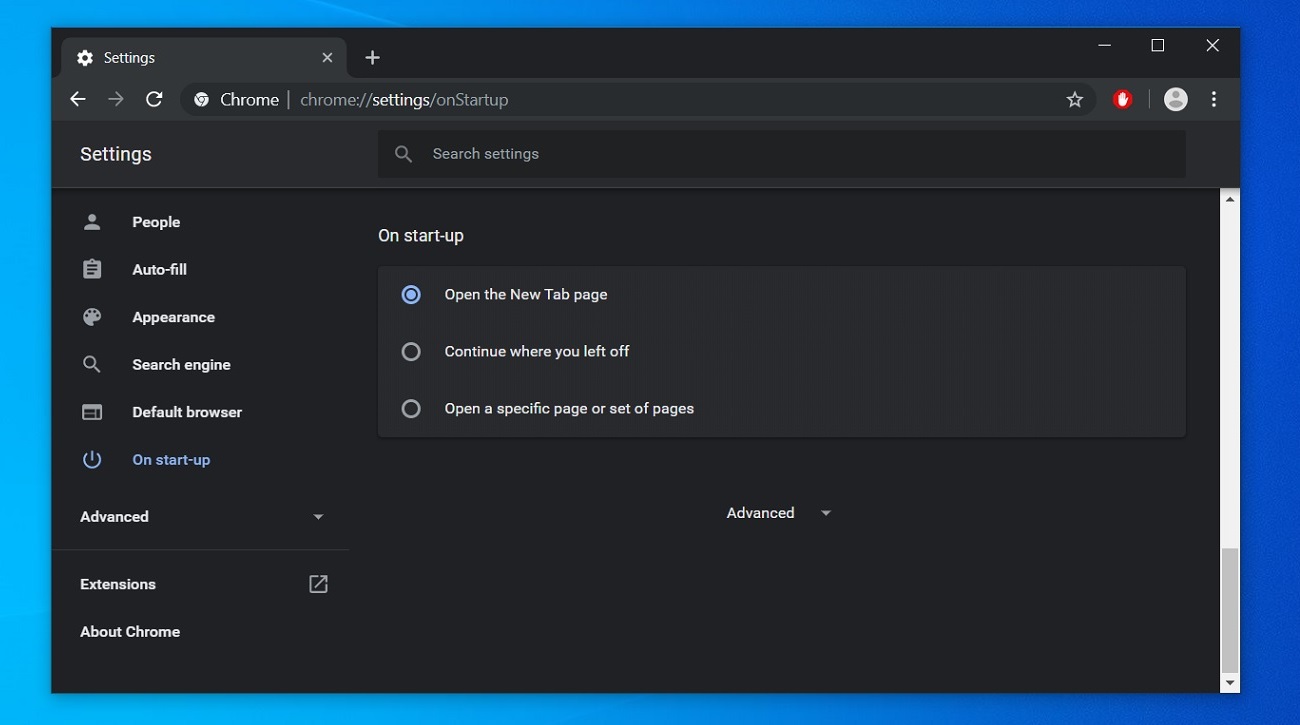
As you can see in the screenshot, Google has removed the hamburger menu and added a sidebar so you can switch between multiple settings quickly. Like Microsoft Edge, all settings categories of Chrome are now placed on the left side of the screen that makes them easier to browse.
At the moment, the new layout is available to Google Chrome Canary testers only, but these changes could be rolled out to the public in a future release.
Other Google Chrome improvements
At Google’s I/O 2019 developer conference, the search engine giant announced its plans to add support for new privacy and security features in Chrome.
In a future update, Google Chrome will be getting same-site cookies functionality and anti-fingerprinting protection.
Google is planning to add a new option in the settings panel that would allow users to understand how sites are using cookies. Chrome will also offer simpler controls for cross-site cookies.
The post Google Chrome to get a slighted tweaked Settings page layout appeared first on Windows Latest
Comments