Windows Latest Windows Latest
The Raspberry Pi has caught the attention of geek out there as it aims to bring a proper computing experience for just $35. Raspberry Pi is a credit-card-sized computer and the price varies from $5 to $35.
Raspberry Pi functions as a proper desktop computer but it runs Windows 10 IoT Core, a version of Windows optimized for smaller devices and ARM devices. Windows 10 IoT is a great choice for a developer, but for the everyday consumer, it is apparently not the best choice.
Microsoft wants Windows 10 to run on every type of computing device and the company has been lately trying to make Windows more modular. Microsoft’s Windows 10 on ARM initiative brought the company’s desktop operating system to devices with Snapdragon chipsets.
It looks like you can now finally install a full version of Windows 10 intended for ARM devices on Raspberry Pi 3.
After launching Windows 10 on ARM for Lumia 950 and 950 XL handsets, the same group of third-party developers have now released a WoA installer which brings Microsoft’s Windows 10 on ARM experience to Raspberry Pi 3.
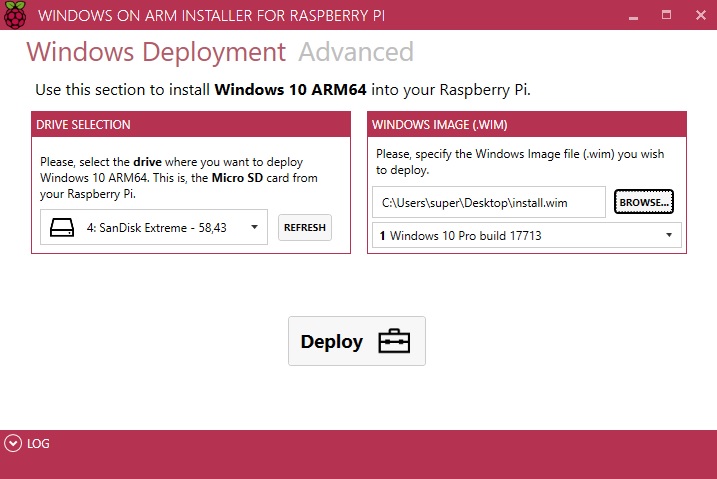
As the name suggestions, the tool is an installer and with a couple of taps, you can install the full version of Windows 10 ARM on your Raspberry Pi 3.
On the Github page, developer José Manuel Nieto says that the tool has been designed with simplicity in mind and you don’t need to worry about drivers, UEFI and other advanced options because the installer does almost everything for you.
“WoA Installer is only a tool with helps you with the deployment. WoA Installer needs a set of binaries, AKA the Core Package, to do its job. These binaries are not mine and are bundled and offered just for convenience to make your life easier, since this tool is focused on simplicity,” José Manuel Nieto explains on the Github page.
Install Windows 10 on ARM on Raspberry Pi 3
You can use the third-party installer if you have a Raspberry Pi 3 Model B (or B+) and MicroSD card with the A1 rating. To install Windows 10 ARM on Raspberry Pi 3, here’s what you need to do:
- Download the Windows 10 ARM image, WoA installer and Core Packages from here.
- Run WoA Installer and go to the Advanced section.
- Click on ‘Import Core Package’ option and select the package directly.
- After importing, you will be allowed to use deploy Windows option.
The post Developer releases WoA installer to bring Microsoft’s WoA to Raspberry Pi 3 appeared first on Windows Latest
Comments