Windows Latest Windows Latest
Most of the websites are full of images and scripts which can be a huge bottleneck for performance. Google is aware of the performance issues and the company is working on a new feature called image lazy-loading to speed up the webpages page loading.
The latest Canary build of Google Chrome comes with the highly anticipated lazy loading feature.
Enable image lazy-loading in Google Chrome
- Download and install Google Chrome Canary
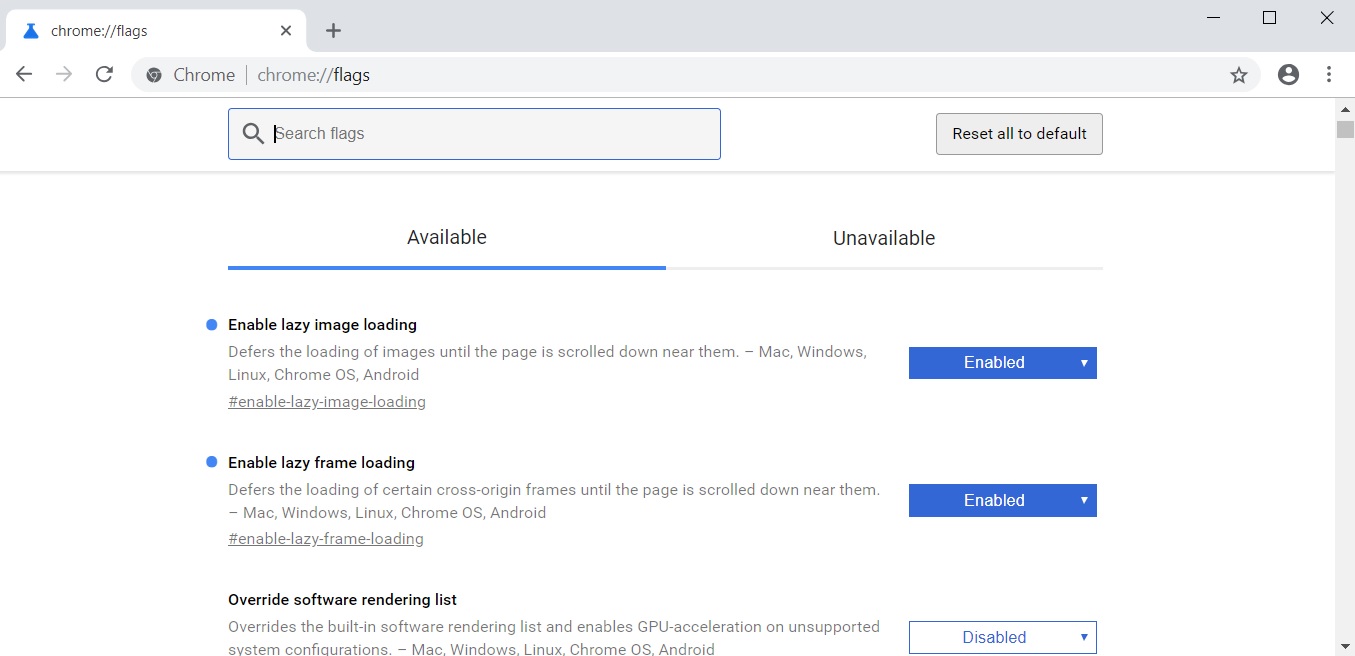
- Open the flags menu and search for #enable-lazy-image-loading and #enable-lazy-frame-loading
- Enable the flags and Chrome would start lazy loading the images.
- Restart the Chrome browser.
This would improve the user experience, make website load faster and accessible for users without a fast connection. That’s a big improvement for such a small change. It is however worth noting that feature is not working properly at the moment.
For those unfamiliar with the lazy load mechanism, it’s a technique where the browser does not load the images that are not in the viewport. Chrome will load the images only when it gets near the border of the viewport.
The post Google Chrome Canary gets lazy-loading feature to speed up page loading appeared first on Windows Latest
Comments